I lack the photography gene

Chickadee60 81

Fish Fanatic
Supporting Member ⭐
Joined
Aug 30, 2026
Messages
150
Reaction score
184
Points
43
Location
Michigan US
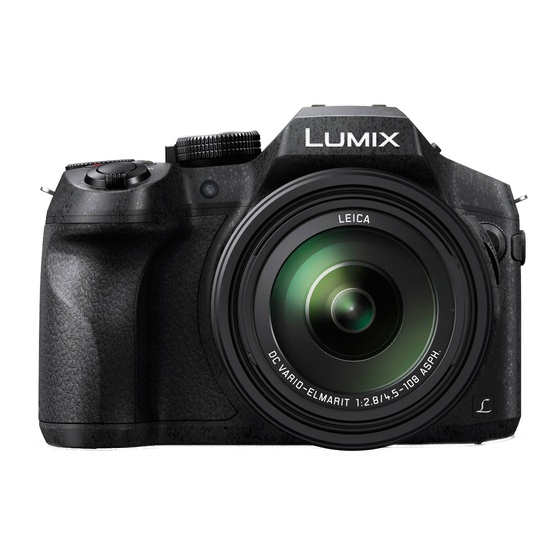
I have a Panasonic Lumix FZ300 point and shoot camera that I paid good money for. I take a lot of pet and wildlife pics and wanted good quality photos without having to learn how to use a DSLR. I've struggled with it since the day I got it. I've watched tutorials on YouTube, but it was overwhelming and I lost interest. Shouldn't a point and shoot camera be fairly automatic? My cheap cell phone and iPad take better pictures.

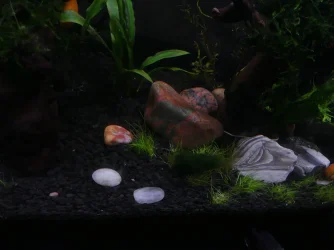
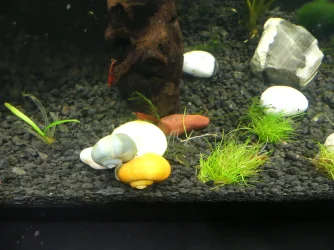
Here is what I'm talking about. The snails are eating a slice of yellow squash, but it looks like a glowing disk. The white rocks are glowing too. I have the same problem when I take snowy pictures outside. The snow is always so white it's glowing. I'm sure there's an adjustment for this and I'll figure it out someday. If anyone knows the trick to this, please share!
 

Attachments

  • P1010530.webp
    P1010530.webp
    226.6 KB · Views: 22
I an similar. I do not use a smart phone which takes better pics. My digicam had to be at least 10 years old. I use it in the auto mode. In the old days of film cameras I use to do B&W fil, developing and then printing in home based darkroom I set up in a bathroom. I worked mostly at night and blocked any light that might come under the door etc.

In the late 1960s I worked as an assistant in a commercial photo studio in New York City. I also worked in an large private art galler where one of my jons was to photograph the collection. They had a huge bellow camera for thay. I loaded and used sheet slide film 5x7 and 8-10 size. I was close to being a professional photographer. By 1970 I had left the photo field. I lost the skills and knowledge because I never used it again. When I got fish, cameras were digital with no film and I just used the auto setting.

Now what I do is shoot a bunch of pics and hope one will be usable. That is why so many of the tank pics I post here are so poor. I have issues with how small a digital camera is. I cannot even pick one up without accidentally pushing something I had no desire to. I hate todays tiny devices and that includes a smart phone which I do not use. However, I do know they take excellent pictures which work way better doing point and shoot than a digicam.

I had a smart phone which I got tto serve as a way to get online with a laptop when at fish events. But fortune made both devices unnecessary because I developed several customers who became large volume repeat buyers and the fish moved out with my needing the phone or three laptap. The smart phonn has been in a drawer no for over 3 years and has no charge and has not for most of the time. I tried to use it as a camera but I do not work well with touch screens. The laptop went back into service because my PC still uses Windows 10 with the addition support for which Microsoft charges.

But I have used TurboTax since it was DOS based and they required Windows 11 to work as of last year. My PC guy was able to force 11 onto the old laptop. I used it for about 1 week or 10 days last April for that and it has not been turned on since. I will use it again when I file this year's taxes in Apr, 2027. Fpr everything else I do online etc, I use Win 10. I still have my old windows 7 box which I kept as I can work the picture editing software on it. it is never used to be online. The editor can fix a lot of the bad camera pics I usually take.

If you have a snmart phone, that would be the best way to take fish related pics.

p.s. I do not use anything with a touch screen as 9/10 times I touch a screen, nothing happens. I have dry skin and having my hands in tanks a lot makes it even worse.
 
Last edited:
@Jennet Thanks, I've gone through the manual but was never able to figure out how to solve my particular issues from reading it. I think the white light has to do with the ISO setting. Now that I'm retired I will have more time to delve into it.

@TwoTankAmin I can relate. Unless I have my reading glasses handy, my cell phone is useless to me. I use it as little as possible. The iPad has been nice though. I hate Windows. I changed my ancient desktop computer over to Linux Mint a few years ago. Of course there's a learning curve with that too, but all in all I have far less problems such as freezing up, lagging, etc.
 
I have a Panasonic Lumix FZ300 point and shoot camera that I paid good money for. I take a lot of pet and wildlife pics and wanted good quality photos without having to learn how to use a DSLR. I've struggled with it since the day I got it. I've watched tutorials on YouTube, but it was overwhelming and I lost interest. Shouldn't a point and shoot camera be fairly automatic? My cheap cell phone and iPad take better pictures.

Here is what I'm talking about. The snails are eating a slice of yellow squash, but it looks like a glowing disk. The white rocks are glowing too. I have the same problem when I take snowy pictures outside. The snow is always so white it's glowing. I'm sure there's an adjustment for this and I'll figure it out someday. If anyone knows the trick to this, please share!
The problem you have is that you have a dark substrate and lighter coloured squash / rocks in the same photo. A camera has to decide if you want details of a dark substrate or of a lighter coloured squash and rocks. Because you have a large area of dark substrate, the camera decides to "expose" for the substrate, so you end up with a picture of a nice substrate but "washed out" or "overexposed" rocks.
You can tell the camera what you want by go to page 28 of the Basic Owner's Manual (the second link provided by Jennet). Where you see the picture of the cat, adjust the exposure by moving the Plus/Minus sign to -2. What you're doing is telling the camera that you want to "underexpose" the picture by "2 stops", i.e. make everything darker. If the rocks are still too bright, try -3 and see how you go. You should end up with a compromised photo, one with detail of rocks and squash but much darker substrate. Your other option is not to make changes to the camera settings but replace rocks with a darker ones. Would like to hear how you go.
 
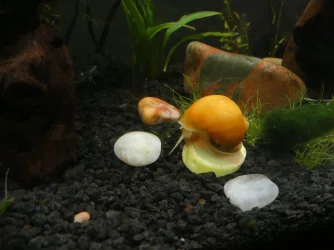
@TNG thanks for this very helpful explanation, even taking the time to point it out in the manual (which was lost on me). It took me awhile to find the +/- button, but I finally got there. No squash tonight, but the rocks look better. It's a little on the dark side, but I get the idea now. I see what you mean though. I will have to decide whether I want to accentuate the background or object. Very helpful :thanks:
 

Attachments

  • P1010564.webp
    P1010564.webp
    111.8 KB · Views: 16
What the heck. I quickly blanched some squash to really test it out. Looks 100% better, no?
 

Attachments

  • P1010570.webp
    P1010570.webp
    118 KB · Views: 15
thanks for this very helpful explanation, even taking the time to point it out in the manual (which was lost on me). It took me awhile to find the +/- button, but I finally got there. No squash tonight, but the rocks look better. It's a little on the dark side, but I get the idea now. I see what you mean though. I will have to decide whether I want to accentuate the background or object. Very helpful :thanks:
I could see that it was an exposure problem, so I just searched for "exposure" in the manual.

What the heck. I quickly blanched some squash to really test it out. Looks 100% better, no?
That is a good photo, might even win the snail-of-the-month competition :).
 
I'm sure this camera can do great things. It's the operator that needs work. I'm bad at reading instructions. There's a guy on YouTube that does a tutorial series on these cameras. I should take the time to watch them.
 
Just thought I should mention this, remember to set the exposure bias back to zero or your future photos will all be underexposed.
 

Most reactions

Back
Top