Fluval Aquasky 2.0 Light

BKyler

New Member
Joined
Jul 7, 2026
Messages
30
Reaction score
9
Points
8
Location
Pennsylvania
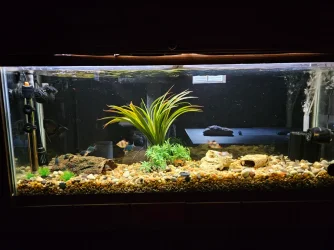
I have had this light for over a year and I have yet to be able to get the lighting in my 55 gallon freshwater fish only aquarium to where it looks nice. Right now I'm running the 24 hour sunrise, daylight, sunset, night, sleep Auto Mode program. I can't get the daylight colors and percentages adjusted correctly to where my aquarium looks nice. Now I'm trying the Pro Mode and after entering all my timepoints when I go to save them they won't save my timepoints and are missing some of the times that I just entered. It's very frustrating and I wish I had never purchased this light. Any suggestions/help would be greatly appreciated.
 
I have never worked with this light but the bright white LEDs produce a majority of the light, with a 55 gallon tank you will need to have a high percentage of the total light output on to provide enough lights for the plants (its only 34 watts). I would start with using only the white light component (ie mid day level), this would be your base likely somewhere about 70-80% light (this is the majority of the light for the plants comes from). From this base I would then ask "do I want the color to be warmer, or colder", if you need warmer then bump up the red from 0% till you get the color temp you want (note this is an illusion because the white lights are likely already at 6500k) you might need to bump the red up to 100%, If you want the light to have some more yellow color, sunlight like, then you will also need to bump up the green channel, again maybe up to 100%. The biggest issue is that with this light you have a more limited RGB capabilities because the discrete colored LEDs only provide a small portion of the full lighting potential of the light.
 
I have never worked with this light but the bright white LEDs produce a majority of the light, with a 55 gallon tank you will need to have a high percentage of the total light output on to provide enough lights for the plants (its only 34 watts). I would start with using only the white light component (ie mid day level), this would be your base likely somewhere about 70-80% light (this is the majority of the light for the plants comes from). From this base I would then ask "do I want the color to be warmer, or colder", if you need warmer then bump up the red from 0% till you get the color temp you want (note this is an illusion because the white lights are likely already at 6500k) you might need to bump the red up to 100%, If you want the light to have some more yellow color, sunlight like, then you will also need to bump up the green channel, again maybe up to 100%. The biggest issue is that with this light you have a more limited RGB capabilities because the discrete colored LEDs only provide a small portion of the full lighting potential of the light.
He said fish only so i presume no plants. I never liked the askey light and suggest you pony up on hygger 957 or chiros b - both of these are low end lights but they look pleasing enough (imho). I'm not sure what you've tried but you don't need pro mode - you need to adjust the individual colours - also a picture would help a lot - is the tank too cool too warm too red too blue .... saying it deosnt' look nice and you can't figure out how to save pro mode is not helpful - according to what i read there is a limit of 10 points so if you set more than 10 that might be your problem.
 
It is fish only; no plants. I had a Hygger HG-978 before the Aquasky 2.0 and had nothing but problems with it. The problem I'm having is the Aquasky is giving my aquarium water a yellowish tint. I only have 5 timepoints in the Pro Mode so that can't be the problem. I read that if your Aquasky 2.0 is running an older firmware, the app may not save Pro Mode changes. It's not showing that there is an update available.
 

Attachments

  • 1000003328.webp
    1000003328.webp
    206.1 KB · Views: 38
I don't have your light but on the plant 3.0 there is an info screen that shows the currently installed firmware - under setting.

In manual mode you can set the individual colour of the led and i would first see if you can get a pleasing spectrum. All my plant 3.0 are too yellow. According to mr google you can force a firm ware update as follow (never tried this):
---------------------------
To force a firmware update on your Fluval Aquasky (or similar Fluval smart LED), delete the light from your app, access the "hidden" update menu by tapping the version number in settings, and re-add the light via Bluetooth to trigger an automatic over-the-air (OTA) update. 
Here is the step-by-step process to force the update:
Delete and Re-add the Light: Open your Fluval app, go to your device list, and delete your connected Aquasky light. 
Access the Hidden Update Menu: Go to the main Settings page in the app. Locate the App Version number and tap it rapidly 8 to 10 times. 
Trigger the Update: Navigate back to the "Devices" page and tap the + icon to scan for your light. Select the discovered light from the list, which will prompt the app to push the firmware update. 
Complete the OTA Process: Keep your smartphone very close to the light while the update progresses. Do not leave the app or let your phone screen go to sleep until the update is 100% finished. 
 
1.03 was the last firmware. Hard to give further help without having your actual device but i would use manual mode and just see if you can find a spectrum that you like - all my plant 3.0 are a bit yellow though i never really did try turning down the yellow white led. The ai blade (rather expensive) is more neutral with slight lean to blue - i find the chirios b and hygger 957 more neutral but still slightly warm (i know you don't like hygger and a lot of people don't they are not the most robust light and the chiros b has almost no settings just intensity so either you like it or you don't - of course the 957 is the same way - there is beamworks never owned it but a lot of people like them they are also a low end light so not too expensive most of the other lights i can think of are much more expensive - hum week aqua has a line of lights a lot of people like - but again i've not used any of them so you would have to do your own 'research' but they do have a lower end light that is not too expensive.
 
The problem with the Manual mode is you would have to manually turn it on and off and it would not have the sunrise and sunset feature.
 
The problem with the Manual mode is you would have to manually turn it on and off and it would not have the sunrise and sunset feature.
Right - i'm just saying try to to adjust the colours to see if the light CAN produce the spectrum you want then go back to auto mode and try adjusting the led colours or do a very simple pro mode with sunrise -> day-> sunset

tweaking in manual mode won't delete or wipe the settings you have in the other modes.
 
Of course its personal but this is mine. Its the tank in my signature pic. As you can see I never get close to 100%, I have fish that don't like too much light, a lot of plants and a lot of surface cover. I never bought into the blue moonlight concept but the 10% green wakeup cycle is really cool (IMHO). Pretty much 0 visible algae and healthy plant life - although I intentionally choose easy plants.
20260708_073541000_iOS.webp
 
Thanks but I have no plants and when I enter my timepoints and then hit save it doesn't save what I just entered and that is what I'm trying to figure out why it's not saving what I'm entering.
 
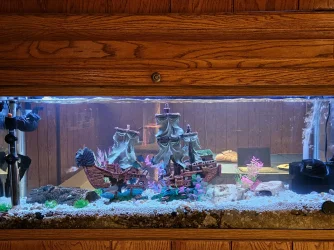
I've gone back to Auto Mode. I tried adding red and green. I have 30% red, 30% green, 100% blue and 5% white. Now it looks like it's cloudy; not crystal clear. If I add more white the water gets that yellowish tint.
 

Attachments

  • 1000003338.webp
    1000003338.webp
    459.6 KB · Views: 21
I've gone back to Auto Mode. I tried adding red and green. I have 30% red, 30% green, 100% blue and 5% white. Now it looks like it's cloudy; not crystal clear. If I add more white the water gets that yellowish tint.
I will say that is a trait of that light just google "aquasky too yellow"; having said that you have too much blue as the blue at 100% will probably promote strong algae.
--
To me the cloudy look is the blue is too high - what if you turn the blue down to 20% ?
 

Most reactions

Back
Top